Wednesday, November 2, 2022

lombok was not importing in Intellij IDEA

 lombok was not importing in Intellij IDEA


What to do :


1. Go to File > Project Structure > Libraries 

2. Press the + icon to add a project

3. Choose 'from Maven'

4. Search for 'lombok' 

5. You will get a long list

6. Slide down to find out 'org.projectlombok....' and choose the latest available

7. Click OK and proceed


Thursday, March 21, 2019

I wish I read this 20 years ago

This article explains what one should learn to understand Spring and Spring boot. By the way, it explains an important hurdle in learning and how to overcome that.

https://codeboje.de/learn-spring-boot-without-spring-knowhow/

It was a great article Jens, but I couldn't find any there provision to give a feedback. But that is fine :) .


Sunday, February 10, 2019

Google adsense stopped working for my blog, yet to find out why

I found that my adsense balance had not changed for a long time. I realized I had not noted for a very long time whether the google ads are displaying in my site or not. When I did, i found that the ads had stopped displaying.

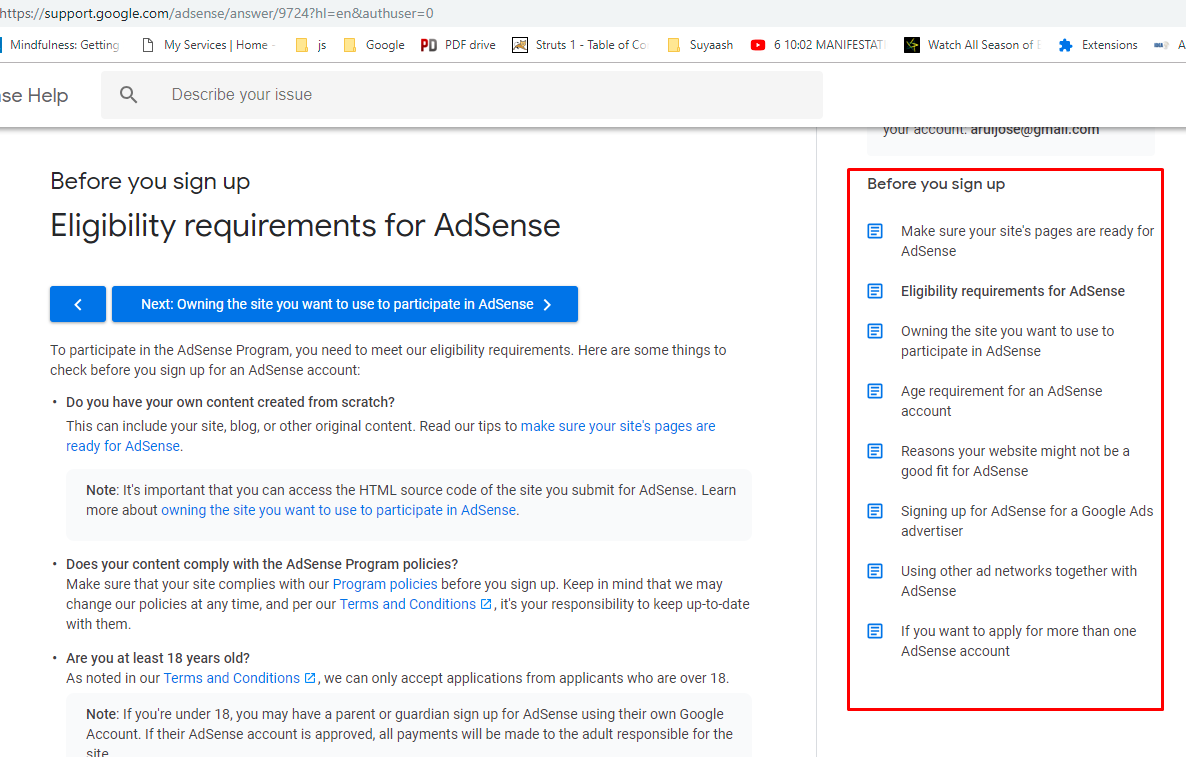
After some search, i found the below page (click to enlarge image) .


The thing is, google had removed the ads for some reason without even sending a notice about it, at least to my email id.

Currently, though i see some eligibility requirements, I still do not know for sure why google ads were removed from my blog.

On the blogger settings, under 'layout', there is an option to add an adsense gadget for my blog, when try adding an adsense gadget using that, the status msg says the gadget is added, when it actually doesn't add (hopefully, this one belongs to the blogger teams' issue list).

The work is still on to find out why. Will update when i get this sorted out.

If you find this blog post useful by any means, please comment 'i like' in the comment section below. Thank you !


Thursday, February 7, 2019

Tutorial old

If by any chance you are referring mkyong's tutorial for Struts 1, it would be very useful to understand beforehand that it is a very old tutorial and this small blog post could save you time. While the latest Struts 1 (version 1.3.10) itself is very old, the tutorial does not even seem to cover the latest version of Struts 1.

For example, the below page asks to add taglib tags to web.xml. But this is no longer required in Jsp 2.0 +.


I am writing this in case someone is wondering why somethings are not working for them while working with that tutorial.

Tuesday, May 1, 2018

Issue while calling java soap web service

If you are facing the below issue while calling a web service :

SOAPOverHTTPS E   WSWS7263E: The following exception occured: org.apache.axis2.AxisFault: WSWS7093W: The HTTP response redirected the target resource to a new location

The issue should most probably outside the application

In my case, my user login is controlled by another external application.

I just logged out and logged in, my app began working normally

--

If this still doesn't work, it may require your cookies to be updated. For example WSL cookies.


Thursday, December 11, 2014

Why my JSF navigation failed - for beginners in JSF

JSF navigation did not work for me with the following content

<!DOCTYPE html PUBLIC "-//W3C//DTD XHTML 1.0 Transitional//EN"
   "http://www.w3.org/TR/xhtml1/DTD/xhtml1-transitional.dtd">
<html  xmlns="http://www.w3.org/1999/xhtml"   
      xmlns:h="http://java.sun.com/jsf/html">
      from page2.xhtml
      <h:commandButton action="home" value="go to home" />
</html>

Caused a standstill since it did not emit any error in logs.

Since <h:commandButton> produces the html <input type='submit' />, it is supposed to be inside a form. So made the correction and it worked.

<!DOCTYPE html PUBLIC "-//W3C//DTD XHTML 1.0 Transitional//EN"
   "http://www.w3.org/TR/xhtml1/DTD/xhtml1-transitional.dtd">
<html  xmlns="http://www.w3.org/1999/xhtml"   
      xmlns:h="http://java.sun.com/jsf/html">
      from page2.xhtml
      <body>
       <h:form>
      <h:commandButton action="home" value="go to home" />
       </h:form>
      </body>
</html>

Thursday, December 4, 2014

An excellent article which explains the basics of configuring a JSF application without using any IDE

If you know JSP and are looking for some help to get started on the basics of JSF without using any IDE or build tool (most tutorials use maven, but for those who have no maven knowledge, many things remain hidden), here is yours :

http://www.theserverside.com/tutorial/Slingshot-Yourself-into-JavaServer-Faces-20-Learning-JSF

Once you complete your JSF setup using the above link, then you can use http://www.tutorialspoint.com/jsf/ to explore further.

Friday, June 13, 2014

[SOLVED] Exception while configuring tiles in Struts 1

Got the following exception while configuring tiles with Struts 1.3.10.

INFO: Loading chain catalog from jar:file:/C:/work/eclipseworkspace/pas/1/.metadata/.plugins/org.eclipse.wst.server.core/tmp1/wtpwebapps/pas/WEB-INF/lib/struts-tiles-1.3.10.jar!/org/apache/struts/tiles/chain-config.xmlJun 13, 2014 10:55:12 PM org.apache.commons.digester.Digester errorSEVERE: Parse Error at line 8 column 77: Document root element "definition", must match DOCTYPE root "tiles-definitions".org.xml.sax.SAXParseException; lineNumber: 8; columnNumber: 77; Document root element "definition", must match DOCTYPE root "tiles-definitions". at com.sun.org.apache.xerces.internal.util.ErrorHandlerWrapper.createSAXParseException(ErrorHandlerWrapper.java:198) at com.sun.org.apache.xerces.internal.util.ErrorHandlerWrapper.error(ErrorHandlerWrapper.java:134) at com.sun.org.apache.xerces.internal.impl.XMLErrorReporter.reportError(XMLErrorReporter.java:437) at com.sun.org.apache.xerces.internal.impl.XMLErrorReporter.reportError(XMLErrorReporter.java:368) at com.sun.org.apache.xerces.internal.impl.XMLErrorReporter.reportError(XMLErrorReporter.java:325) at com.sun.org.apache.xerces.internal.impl.dtd.XMLDTDValidator.rootElementSpecified(XMLDTDValidator.java:1599) at com.sun.org.apache.xerces.internal.impl.dtd.XMLDTDValidator.handleStartElement(XMLDTDValidator.java:1877) at com.sun.org.apache.xerces.internal.impl.dtd.XMLDTDValidator.startElement(XMLDTDValidator.java:742) at com.sun.org.apache.xerces.internal.impl.XMLNSDocumentScannerImpl.scanStartElement(XMLNSDocumentScannerImpl.java:376) at com.sun.org.apache.xerces.internal.impl.XMLNSDocumentScannerImpl$NSContentDriver.scanRootElementHook(XMLNSDocumentScannerImpl.java:602) at com.sun.org.apache.xerces.internal.impl.XMLDocumentFragmentScannerImpl$FragmentContentDriver.next(XMLDocumentFragmentScannerImpl.java:3065) at com.sun.org.apache.xerces.internal.impl.XMLDocumentScannerImpl$PrologDriver.next(XMLDocumentScannerImpl.java:881) at com.sun.org.apache.xerces.internal.impl.XMLDocumentScannerImpl.next(XMLDocumentScannerImpl.java:607) at com.sun.org.apache.xerces.internal.impl.XMLNSDocumentScannerImpl.next(XMLNSDocumentScannerImpl.java:116) at com.sun.org.apache.xerces.internal.impl.XMLDocumentFragmentScannerImpl.scanDocument(XMLDocumentFragmentScannerImpl.java:489) at com.sun.org.apache.xerces.internal.parsers.XML11Configuration.parse(XML11Configuration.java:835) at com.sun.org.apache.xerces.internal.parsers.XML11Configuration.parse(XML11Configuration.java:764) at com.sun.org.apache.xerces.internal.parsers.XMLParser.parse(XMLParser.java:123) at com.sun.org.apache.xerces.internal.parsers.AbstractSAXParser.parse(AbstractSAXParser.java:1210) at com.sun.org.apache.xerces.internal.jaxp.SAXParserImpl$JAXPSAXParser.parse(SAXParserImpl.java:568) at org.apache.commons.digester.Digester.parse(Digester.java:1765) at org.apache.struts.tiles.xmlDefinition.XmlParser.parse(XmlParser.java:281) at org.apache.struts.tiles.xmlDefinition.I18nFactorySet.parseXmlFile(I18nFactorySet.java:514) at org.apache.struts.tiles.xmlDefinition.I18nFactorySet.parseXmlFiles(I18nFactorySet.java:449) at org.apache.struts.tiles.xmlDefinition.I18nFactorySet.createDefaultFactory(I18nFactorySet.java:266) at org.apache.struts.tiles.xmlDefinition.I18nFactorySet.initFactory(I18nFactorySet.java:241) at org.apache.struts.tiles.xmlDefinition.I18nFactorySet.initFactory(I18nFactorySet.java:191) at org.apache.struts.tiles.definition.ComponentDefinitionsFactoryWrapper.init(ComponentDefinitionsFactoryWrapper.java:105) at org.apache.struts.tiles.TilesUtilImpl.createDefinitionsFactory(TilesUtilImpl.java:181) at org.apache.struts.tiles.TilesUtil.createDefinitionsFactory(TilesUtil.java:182) at org.apache.struts.tiles.TilesPlugin.initDefinitionsFactory(TilesPlugin.java:226) at org.apache.struts.tiles.TilesPlugin.init(TilesPlugin.java:141) at org.apache.struts.action.ActionServlet.initModulePlugIns(ActionServlet.java:871) at org.apache.struts.action.ActionServlet.init(ActionServlet.java:359) at javax.servlet.GenericServlet.init(GenericServlet.java:160) at org.apache.catalina.core.StandardWrapper.initServlet(StandardWrapper.java:1280) at org.apache.catalina.core.StandardWrapper.loadServlet(StandardWrapper.java:1193) at org.apache.catalina.core.StandardWrapper.load(StandardWrapper.java:1088) at org.apache.catalina.core.StandardContext.loadOnStartup(StandardContext.java:5198) at org.apache.catalina.core.StandardContext.startInternal(StandardContext.java:5481) at org.apache.catalina.util.LifecycleBase.start(LifecycleBase.java:150) at org.apache.catalina.core.ContainerBase$StartChild.call(ContainerBase.java:1559) at org.apache.catalina.core.ContainerBase$StartChild.call(ContainerBase.java:1549) at java.util.concurrent.FutureTask$Sync.innerRun(FutureTask.java:334) at java.util.concurrent.FutureTask.run(FutureTask.java:166) at java.util.concurrent.ThreadPoolExecutor.runWorker(ThreadPoolExecutor.java:1145) at java.util.concurrent.ThreadPoolExecutor$Worker.run(ThreadPoolExecutor.java:615) at java.lang.Thread.run(Thread.java:722)


The problem was : I did not enclose my 'definition' tag in my tiles-defs.xml with the , since i referred Struts Examples page (I'd call it a poor documentation, poor availability too, some pages are missing at this point of time).

Find below the correct tiles-defs.xml :

<?xml version="1.0" encoding="UTF-8"?>
<!DOCTYPE tiles-definitions PUBLIC
"-//Apache Software Foundation//DTD Tiles Configuration 1.3//EN"
"http://struts.apache.org/dtds/tiles-config_1_3.dtd">
<tiles-definitions> <!-- THIS TAG WAS MISSING -->
<definition name="default-template" path="/common/tiles/default-layout.jsp">
  <put name="header"  value="/common/Header.jsp" type="string" />
  <put name="menu" value="/common/Menu.jsp" type="page" />
  <!-- put name="body"   value="/index.jsp" type="page"  -->
</definition>
</tiles-definitions>


Tuesday, May 21, 2013

Error running javac.exe compiler - ant compilation error


I am using windows 7 and had installed java under C:\Program Files (x86)

May be the space or the special chars in the path should have created problem with ant

Just copied the java folder from C:\Program Files (x86)\ to D: and set my JAVA_HOME to D:\java\jdk1.6.0_11 and added the path D:\java\jdk1.6.0_11\bin to my system path. Ant compiled my code!

Sunday, February 10, 2013

Devices list not appearing on itunes on your computer

Just plug out your usb connector interface and plug-in again

Monday, January 21, 2013

Saturday, September 15, 2012

Firebird query to list out rows having duplicate values in columns


SELECT * FROM "TABLE1" t1 WHERE EXISTS (SELECT 1 FROM " TABLE1" t2 WHERE t1."COLUMN1" = t2."COLUMN1" AND t1.RDB$DB_KEY < t2.RDB$DB_KEY);

This query will list out only the rows from TABLE1 which have duplicate values in COLUMN1.


Saturday, August 4, 2012

I moved my netbeans settings and projects to my new computer

1. Install netbeans and close netbeans if open. Before proceeding with any of the steps below, make sure you take zip/backup the necessary files/folders in the folders which you copy to.

2. Moving netbeans settings:
You will find the folder having netbeans settings within your windows user profile. I use windows 7. So I found this here : C:\Users\my-windows-user-name\.netbeans. To move your settings, just move the folder (under C:\Users\my-windows-user-name\.netbeans) with the name having your netbeans version (I use netbeans version 6.9 so the folder name was 69 without the dot in between).

3. Moving netbeans projects:
To know where netbeans creates project settings in your computer, just try creating a sample project. While creating your new sample project, the second step 'Name and Location' will show the default Project Folder. This is where you will have all your project settings, just move the folder to the new computer to the same directory.

For example the 'Name and Location' shows your project folder as C:\Users\ my-windows-user-name\MyDocuments\NetBeansProjects\JavaProject7, your projects will be found in just one folder under, that is here : C:\Users\ my-windows-user-name\MyDocuments\NetBeansProjects\

5. Move your source files to the same directories you had in your old computer.

4. Start netbeans to find your old settings in your new netbeans installation.

Hope this helps.

Tuesday, September 27, 2011

firebird.msg not found


D:\firebird\bin>isql -u sysdba -p masterkey D:\firebird\OpUtilsDB.fdb
can't format message 17:0 -- message file D:\firebird\firebird.msg not found
unavailable database
can't format message 17:3 -- message file D:\firebird\firebird.msg not found
SQL> exit;
To solve this problem,
  1. Stop if you have any firebird instances running
  2. Change the value of the var 'CreateInternalWindow' as 1 in firebird/firebird.conf
  3. Start firebird (run fbserver -a from firebird/bin)
  4. Then run the isql command


Monday, December 27, 2010

Setting character set for tomcat requests and responses

To set character set for your tomcat requests and responses, add param URIEncoding="UTF-8" (if you need your character set to be UTF-8) in the Connector tag of server.xml.

To start firebird in windows

Run command fbserver.exe -a from the firebird/bin directory (Note: firebird dir is the firebird installation dir - the name could differ with the version)

Saturday, December 19, 2009

Call a js function using a string variable having the function name

Hope the following coding snippet helps to know how :

<script>
testFCall();
function testFCall()
{
setTimeout('testCall(109)',0);
}

function testCall(val)
{
alert('val : '+val);
}
<script>


Friday, October 2, 2009

Run os commands from java + print error messages

private void runProcess() throws Exception
{
try
{
Runtime rt = Runtime.getRuntime();
Process process = rt.exec("cmd /c cp C:\\work\\dev\\test.txt C:\\work\\dev\\test1.txt");
BufferedReader input = new BufferedReader(new InputStreamReader(process.getInputStream()));

String line = null;

while ((line = input.readLine()) != null)
{
System.out.println(line);
}

int exitVal = process.waitFor();
if (exitVal != 0)
{
input = new BufferedReader(new InputStreamReader(process.getErrorStream()));
line = null;

while ((line = input.readLine()) != null)
{
System.out.println(line);
}
}
}
catch (Exception e)
{
System.out.println(e.toString());
e.printStackTrace();
}
}

Tuesday, June 23, 2009

cvs command to see the status in a single line

We can use the command - 'cvs status'. But it is too verbose. You may not need all those details all the time.
To see the status in a single line do - cvs -q -n update
Courtesy :
http://stackoverflow.com/questions/211819/is-there-a-way-to-get-a-short-cvs-status-from-command-line


Friday, June 19, 2009

Nebeans debugger msg : delete method not implemented

When I apply code changes using netbeans debugger, i get this message :
The virtual machine does not support this operation: delete method not implemented
and I am not able to apply my code changes.

The problem was :
I had another file where i had added a method and had not compiled. so not able to apply code changes. (debugger does not allow adding new methods. If you add or remove a method [or any other type of class member] you have to compile the code before using debugger).